



A valuable tool for relocating and adjusting existing constructions in Minecraft.
MoveWand
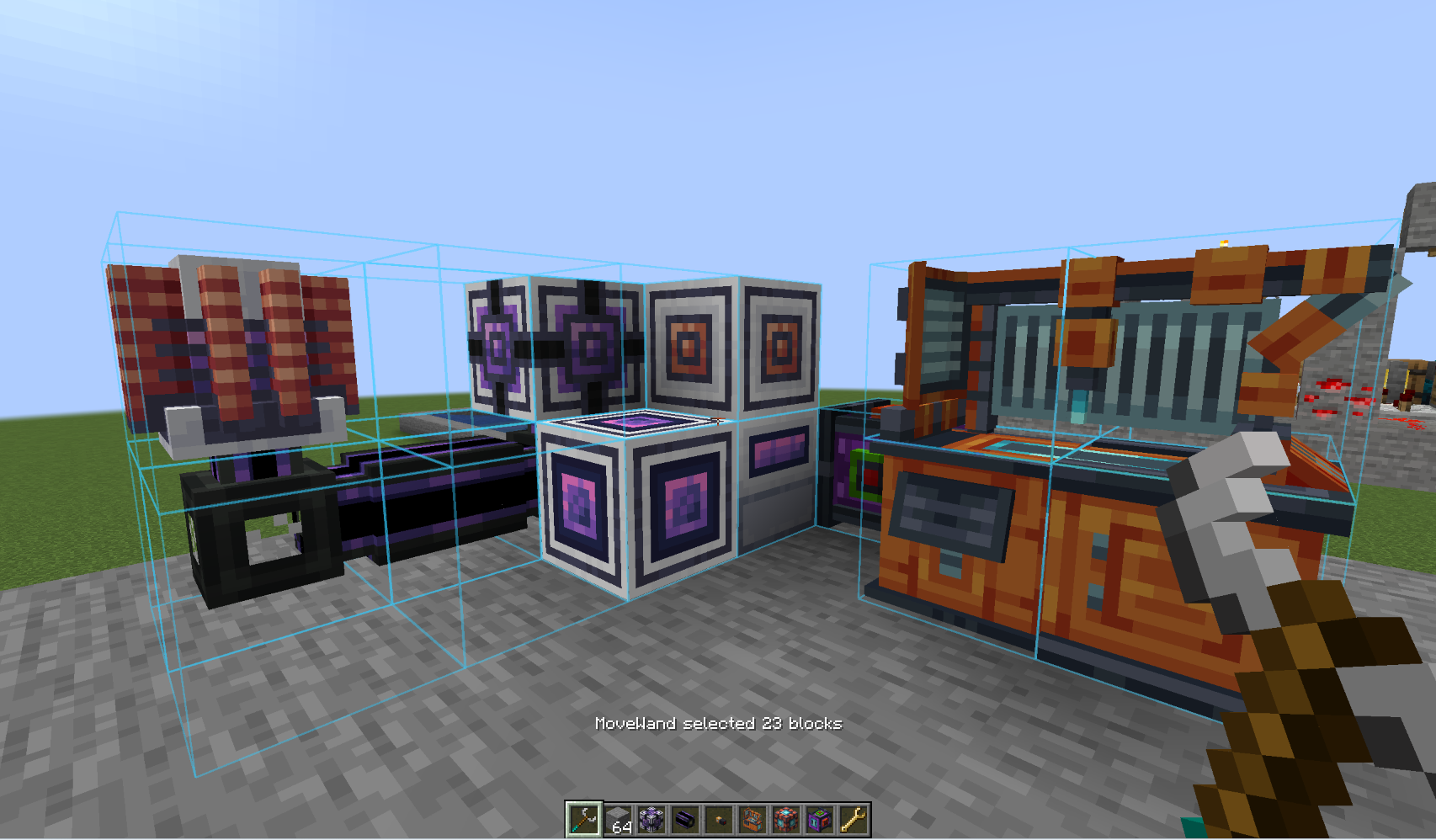 MoveWand is an innovative mod designed for Fabric and NeoForge, providing a handy tool for players looking to move and rotate structures with ease during survival play. Unlike WorldEdit, this mod doesn’t function as a copier or pasting tool; instead, it allows users to reposition mechanisms, create space, or rotate parts of their builds without the need for complete demolition and reconstruction.
Crafting Recipe
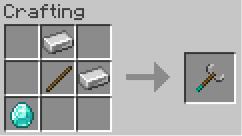
To create a MoveWand, you will require one stick, two iron ingots, and a single diamond. The transformations performed using the MoveWand do not deplete durability or affect hunger levels.
How to Use the MoveWand
- Equip the MoveWand in your main hand.
- Right-click on two blocks to define a selection box, or use
Shift+ right-click to modify your selection by adding or removing specific blocks. - Press a movement or rotation key to view a transformation preview.
-
Action Default Key Description Arrow Keys N/A Move the selection forward, backward, left, or right based on the player’s perspective. R / V N/A Shift the selection upward or downward along the world’s Y-axis. [ / ] N/A Rotate the entire selection around the Y-axis in 90-degree increments. Enter N/A Confirm and apply the selected transformation. Backspace or Esc N/A Abort the current transformation preview. Delete N/A Clear the current selection. Users can customize all key bindings through the Minecraft Controls menu. If you have the Mod Menu installed, you can access the MoveWand configuration settings for key customization.
Operational Safety and Limitations
- The maximum number of blocks that can be selected is 512.
- The pivot point can shift a maximum of 16 blocks from its original location.
- Each movement is validated by the server before any world modifications are made; if a conflict arises, the entire transformation will be rejected.
- Selection destinations can either be empty spaces, part of the moving selection, or areas where non-source fluids exist, as source fluids cannot be moved.
- Blocks requiring support—such as short grass, flowers, torches, and dripstone—must be capable of sustaining themselves at their new location once the transformation is complete.
- Doors and beds are treated as paired entities, meaning both parts must be moved together. When moving a double chest, both segments must be included; attempting to move just one will result in rejection with a warning.
- The first box corner or the initially selected block will act as the pivot. After successfully moving a structure, the server updates the selection and pivot to the new coordinates for any subsequent operations.
- MoveWand maintains
BlockStateand transfersBlockEntitydata through NBT. However, this is typically a best-effort implementation for third-party blocks that may rely on integration for specific functionalities related to old coordinates. - Current functionalities do not include options for copying, pasting, deletion, destination replacement, or mass construction.
- Only 90-degree rotations are permitted around the vertical
Yaxis. - An Undo function is not available in this version of the mod.
Mod Limitations
Community Feedback
We welcome any insights, suggestions, or feedback regarding the MoveWand mod. If you have a specific version that you would like to see the mod ported to, please reach out, and we’d be glad to assist!


